How a 36-year-old education foundation replaced its aging website with a bilingual, self-serve platform in five weeks of development
When the platform behind its website reached end of life, the St. Lucie County Education Foundation faced losing its site, its forms, and its donation page at once. Operamatix built its next home: 238 pages in English and Spanish, run entirely by the foundation's own staff.
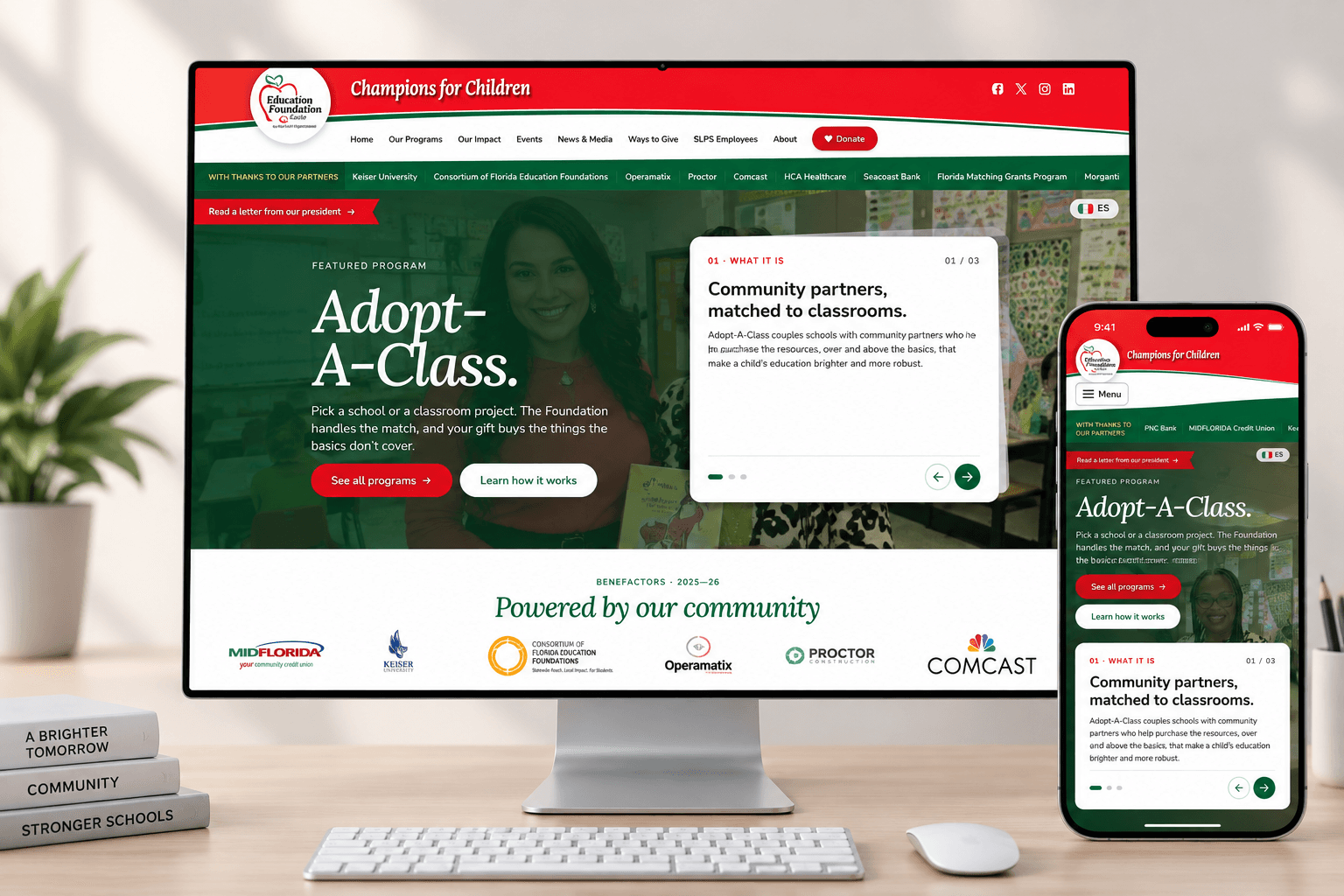
Thirty-six years behind St. Lucie classrooms
The St. Lucie County Education Foundation has supported the students and teachers of St. Lucie Public Schools since 1990. It awards scholarships, funds classroom projects, and runs Adopt-A-Class, which connects local sponsors with teachers across 36 schools. The platform this case study describes is live today at educationfoundationstlucie.org.
A move with a hard deadline
Every website platform has a lifespan, and the one the foundation's site had lived on was reaching the end of its own. A retirement date is a hard deadline: the site, its forms, and 36 years of content all needed a new home, and the foundation's web domains were due for renewal in the same season.
The move was also the moment to catch up with problems that have outgrown that whole era of the web. Bot spam had swallowed the online forms: at its worst, nine of every ten submissions were machines, not people. Card testing, the practice of criminals using any nonprofit's donation form to try out card numbers stolen elsewhere, had struck in waves more than a thousand strong. And email authentication, now table stakes for reaching inboxes, had not yet arrived.
The job was not a redesign. It was a move: carry everything the foundation had built onto ground it owns, on a clock.
A platform the foundation runs itself
Five weeks of development produced the complete replacement. Three things define it.
1. The staff run the site themselves
Foundation staff have always published their own updates; the move gave that work modern tools. A private editing room sits behind the public site, and every editor shows a live preview of the real page beside it, so staff see exactly what the public will see before they save. Words on any live page can be changed in place, English and Spanish side by side.
The clearest example is the yearly Adopt-A-Class roster, which used to mean a season of manual page edits. Now the district's HR spreadsheet goes in exactly as HR exports it: a script reads it, shows a check report of what will change, and on one click regenerates about 3,700 classroom pages, with one-click undo. That single script hands the foundation back about 240 staff hours every year.
Donations are managed from the same place, so staff never juggle a second system. A saved change is live on the public site in about a minute, with no developer involved.
2. A modern front door
The site is built phone-first: every page, form, and donation flow is designed for the phone in a visitor's pocket, then scaled up to the desktop. Every page has a Spanish twin, including the page a mistyped link lands on. Donations happen in place: a giving window opens over the page instead of sending the visitor away to another site. And every teacher in the district has a shareable page with its own QR code, so a sponsor can go from a flyer to a classroom in one scan.
The site moves with intention. Numbers count up, sections reveal as you scroll, and all of it stands down for visitors who prefer reduced motion. Staff sign in with the Google accounts they already have. And when a page is texted to a friend, it arrives as a branded card, not a bare link.
3. Built to last
The parts a visitor never sees are the parts that decide whether a nonprofit's website is still standing in five years. In plain English, here is what the foundation now stands on.
| What we built in | What it means for the foundation |
|---|---|
| Card safety | Donations run through Givebutter's own secure checkout, so card numbers never touch the foundation's site. And every donation record is confirmed directly with Givebutter before it enters the books, so nothing is taken on a stranger's word. |
| Security by design | Permissions are enforced by the database itself, not by promises in page code. Every visitor and staff member can only do what their role allows, and the one path the public can write through is cryptographically signed. |
| Spam, ended | Every form quietly verifies that a person, not a script, is on the other end, at no cost to the visitor. The flood of bot submissions ended at launch. |
| Fails soft | If the database is ever unreachable, the site quietly serves its last saved content instead of an error page. Visitors never see a blank screen. |
| Accessible today | Audited page by page against WCAG 2.1 AA with zero violations found, well ahead of the federal accessibility deadline that reaches public institutions in April 2027. |
| Light to run | A modern web framework, a global deployment platform, and a managed open-standard database, each the current standard of its field. The site is fast on phones, costs almost nothing to operate when idle, and the foundation pays only for what it actually uses. |
| Native to the AI age | The architecture is modern, structured, and machine-readable, chosen for stability first. It will still be standard, supported technology a decade from now, and it is clean ground for the always-on agent that keeps the site healthy. |
The accessibility bar above is the Department of Justice's 2024 web accessibility rule, which reaches public institutions of this county's size in April 2027.
Before and after
| Area | Before | After |
|---|---|---|
| Contact form | Missing from the site for years | Restored, protected, and delivered reliably |
| Forms | 40 legacy forms, buried under bot spam | Rebuilt one for one, with the spam designed out |
| Donations | A repeated target for card-testing bots | Card data never touches the site |
| Domains and email | Five domains near expiry, email unauthenticated | Consolidated, renewed, and authenticated |
| Publishing a change | Self-serve, in one language | Self-serve in two, with live preview, in about a minute |
The switch itself took fifteen minutes, with no downtime. Forty minutes after launch, the foundation's team built an entire new scholarship, campaign, bilingual page, and homepage tiles, using only the tools that had shipped that afternoon.
Why five weeks was enough
Five weeks was enough because nothing here is improvised. The platform is assembled from stable, standard, machine-readable parts; the project's full history lives in durable records rather than in anyone's head; and every change, from the first commit to today, ships only after a person has reviewed and approved it.
The site is also never unattended. Alto, a cloud-hosted agent devoted solely to the foundation's platform, watches it around the clock: uptime monitoring, security patching, dependency updates, and routine upkeep, all under the same rule, where changes are proposed and a person approves them. That is what always-on AI operations look like when they are built with accountability first.
Five questions to ask about your nonprofit's website
What happens to your website if your vendor disappears?
If your site lives inside a vendor's proprietary system, their retirement becomes your emergency. Ask who owns the content, whether it can be exported, and what a transition would look like.
How much of your form inbox is real?
When spam outnumbers genuine submissions, staff stop trusting the forms and real applicants fall through. Modern spam protection is invisible to humans and should cost your visitors nothing.
Does your donation page ever touch card numbers?
If card data passes through your site, your site is a target. A hosted checkout from your donation platform keeps the risk, and the compliance burden, off your organization entirely.
Will your site meet the 2027 accessibility deadline?
New federal rules bring WCAG 2.1 AA requirements to public institutions by April 2027, and nonprofits that partner with them are wise to meet the same bar. An audit now is far cheaper than a retrofit later.
Who can publish a change, and how long does it take?
If every wording fix waits on a developer, your website is always slightly out of date. Staff should be able to change the words on a live page and see the result before they save.
Your mission deserves this kind of ground
If any of the five questions above gave you pause, we should talk. Bring your website as it is, and we will tell you honestly what it needs, whether or not that work is ours to do.